# Classes Listing

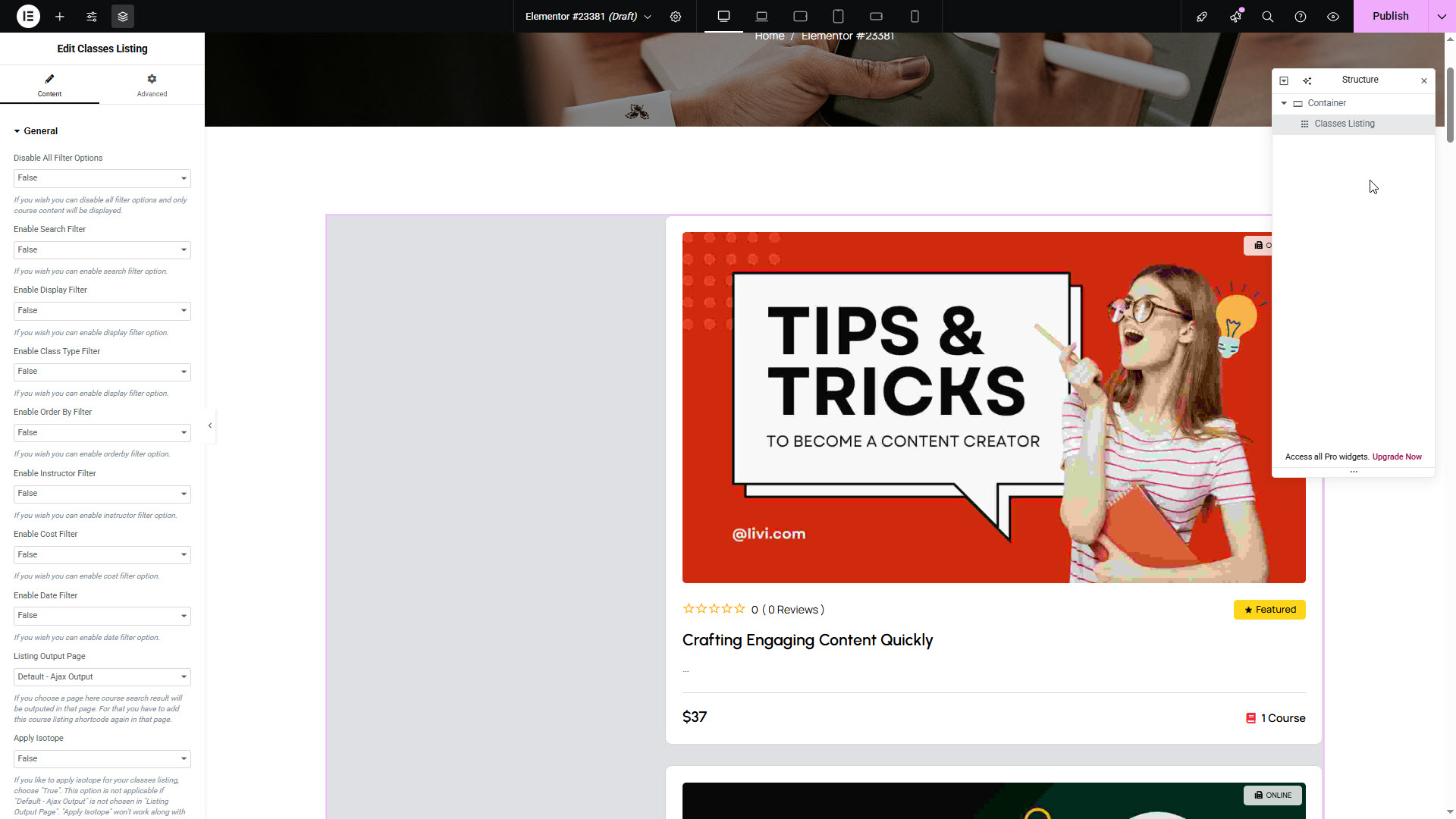
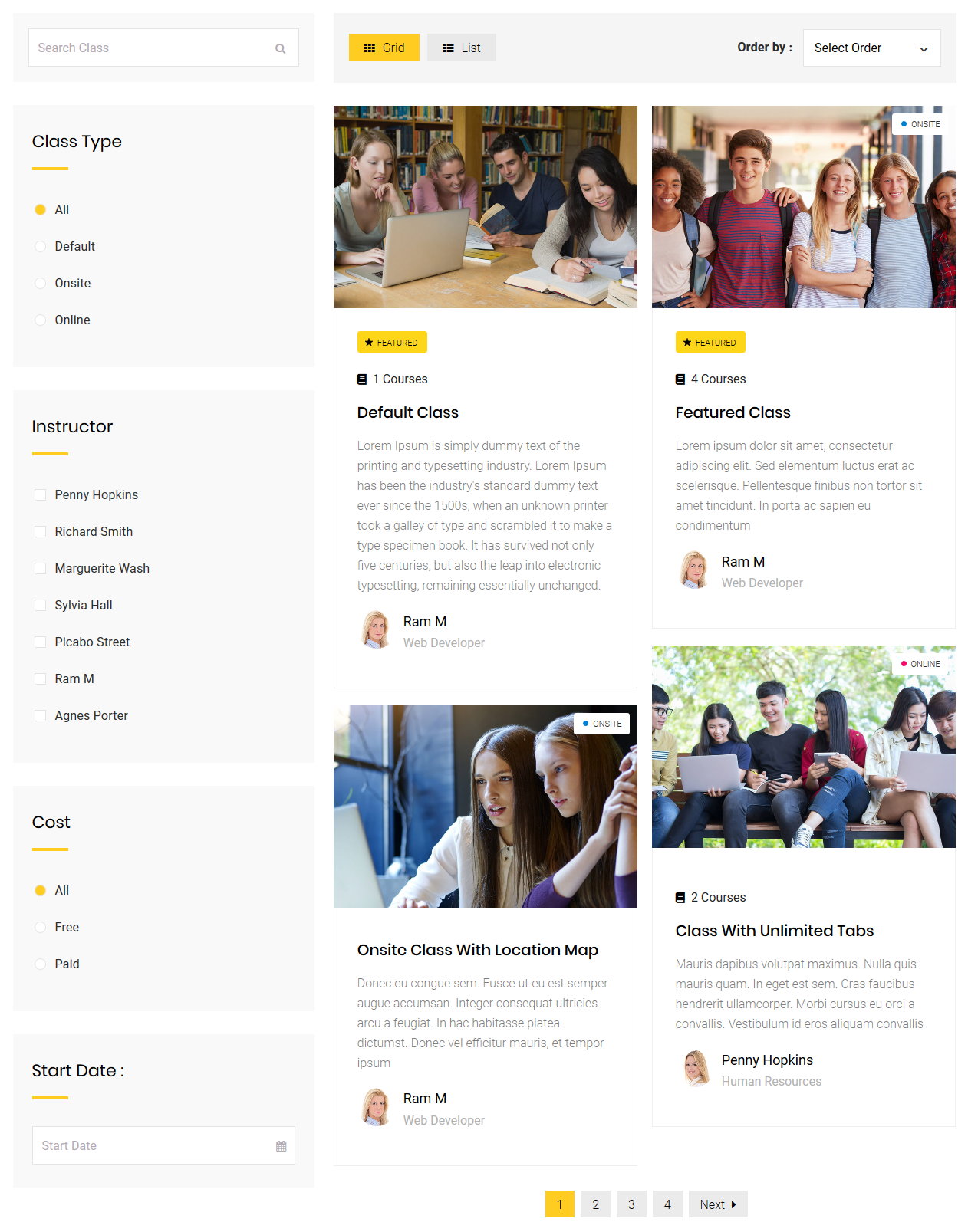
The **Classes Listing** shortcode allows you to dynamically display a list of classes on any page or post within your site. This shortcode can be customized with several parameters to control the appearance, filtering, and layout of the class listings.

<figure><img src="https://content.gitbook.com/content/FWDykheMbBOzsPpHi9FR/blobs/cm2PSYp0wUwuwutBrJg4/class_listing.jpg" alt=""><figcaption></figcaption></figure>

#### **Available Parameters**

Use the following parameters to customize the appearance and behavior of the `[dtlms_class_listing]` shortcode:

<table data-header-hidden><thead><tr><th width="258.44439697265625"></th><th></th></tr></thead><tbody><tr><td><strong>Parameter</strong></td><td><strong>Description</strong></td></tr><tr><td><code>disable-all-filters</code></td><td><code>true</code> or <code>false</code> – Disables all 7 available filters when set to true.</td></tr><tr><td><code>enable-search-filter</code></td><td><code>true</code> or <code>false</code> – Enables the Search Class text field.</td></tr><tr><td><code>enable-display-filter</code></td><td><code>true</code> or <code>false</code> – Enables the Grid/List display toggle filter.</td></tr><tr><td><code>enable-classtype-filter</code></td><td><code>true</code> or <code>false</code> – Enables filtering by Class Type.</td></tr><tr><td><code>enable-orderby-filter</code></td><td><code>true</code> or <code>false</code> – Enables the Order By dropdown.</td></tr><tr><td><code>enable-instructor-filter</code></td><td><code>true</code> or <code>false</code> – Enables the Instructor filter.</td></tr><tr><td><code>enable-cost-filter</code></td><td><code>true</code> or <code>false</code> – Enables filtering by Cost (Free/Paid).</td></tr><tr><td><code>enable-date-filter</code></td><td><code>true</code> or <code>false</code> – Enables filtering by Start Date.</td></tr><tr><td><code>listing-output-page</code></td><td>Select a specific page where search results should be displayed. Choose “Default - Ajax Output” for displaying results on the same page.</td></tr><tr><td><code>default-filter</code></td><td><code>upcoming-classes</code>, <code>recent-classes</code>, <code>highest-rated-classes</code>, <code>most-membered-classes</code>, <code>paid-classes</code>, or <code>free-classes</code>. Requires filters to be off.</td></tr><tr><td><code>default-display-type</code></td><td><code>list</code> or <code>grid</code> – Set the default display type (only applies if “Default - Ajax Output” is selected).</td></tr><tr><td><code>class-item-ids</code></td><td>Comma-separated class IDs to display specific classes (only for non-Ajax output pages).</td></tr><tr><td><code>instructor-ids</code></td><td>Comma-separated Instructor IDs to filter by instructor (only for non-Ajax output pages).</td></tr><tr><td><code>apply-isotope</code></td><td><code>true</code> or <code>false</code> – Enables Isotope layout (not compatible with carousel). Only applies when not using “Default - Ajax Output”.</td></tr><tr><td><code>post-per-page</code></td><td>Number of classes to display per page (non-Ajax output only).</td></tr><tr><td><code>columns</code></td><td><code>1</code>, <code>2</code>, or <code>3</code> – Number of columns to display. “3 Columns” requires <code>enable-fullwidth=true</code> and is valid only when all filters are disabled.</td></tr><tr><td><code>enable-fullwidth</code></td><td><code>true</code> or <code>false</code> – Enable full-width layout (non-Ajax output only).</td></tr><tr><td><code>type</code></td><td><code>type1</code>, <code>type2</code>, or <code>type3</code> – Choose from available display design types.</td></tr><tr><td><code>class</code></td><td>Custom class for additional styling.</td></tr></tbody></table>

***

**Carousel Specific Parameters**

<table data-header-hidden><thead><tr><th width="246.22216796875"></th><th></th></tr></thead><tbody><tr><td><strong>Parameter</strong></td><td><strong>Description</strong></td></tr><tr><td><code>enable-carousel</code></td><td><code>true</code> or <code>false</code> – Enables carousel display (not compatible with isotope).</td></tr><tr><td><code>carousel-autoplay</code></td><td>Set autoplay delay in milliseconds (e.g., <code>1000</code> for 1 second). Leave empty to disable autoplay.</td></tr><tr><td><code>carousel-slidesperview</code></td><td>Number of slides to show (<code>1</code>, <code>2</code>, or <code>3</code>). When display type is set to "List", only <code>1</code> works.</td></tr><tr><td><code>carousel-loopmode</code></td><td><code>true</code> or <code>false</code> – Enables continuous looping of carousel items.</td></tr><tr><td><code>carousel-mousewheelcontrol</code></td><td><code>true</code> or <code>false</code> – Enables mouse wheel navigation.</td></tr><tr><td><code>carousel-bulletpagination</code></td><td><code>true</code> or <code>false</code> – Enables bullet-style pagination.</td></tr><tr><td><code>carousel-arrowpagination</code></td><td><code>true</code> or <code>false</code> – Enables arrow-based pagination.</td></tr><tr><td><code>carousel-spacebetween</code></td><td>Space (in px) between slides. Example: <code>15px</code>.</td></tr></tbody></table>

```
[dtlms_classes_listing disable-all-filters="false" enable-search-filter="true" enable-display-filter="true" enable-classtype-filter="true" enable-orderby-filter="true" enable-instructor-filter="true" enable-cost-filter="true" enable-date-filter="true" apply-isotope="true" columns="2" carousel-slidesperview="1" carousel-loopmode="false" carousel-mousewheelcontrol="false" carousel-bulletpagination="false" carousel-arrowpagination="false" carousel-spacebetween="2px" post-per-page="5" class="custom-class"]
```

<figure><img src="https://content.gitbook.com/content/FWDykheMbBOzsPpHi9FR/blobs/2ycWrsWYwIqgw4fun3Nu/class_listing_shortcode.png" alt=""><figcaption></figcaption></figure>